Client Case Study

We built an end-to-end scheduling, SPLH, and time clock system for a restaurant client.

This was not a product launch page or a simple schedule calendar. The client needed one operating system where managers build the week, keep open shifts visible, approve time off, watch SPLH and labor %, publish schedules, let employees clock in with a PIN, clean up timecards, email schedules, and compare scheduled labor against actuals.

Case Study Answer

What was built?

We built a client scheduling system that covers the full labor workflow: weekly station schedules, open shifts, time-off approval, SPLH and labor % targets, employee PIN clock-in, timecards, actual hours, payroll review, emailed schedules, and multi-location reporting.

Ezeatz Schedules

Demo Workflow

Ezeatz Schedules

A client case study for an end-to-end restaurant scheduling system with weekly builds, open shifts, SPLH, labor %, employee PIN clock-in, timecards, actuals, emailed schedules, and multi-location control.

Operating Flow

From draft schedule to staff schedule, employee clock-in, SPLH, and actual labor.

The client was not just asking for names on a calendar. Their managers needed station coverage, open shifts, approved time off, other-store shifts, overtime risk, projected sales, SPLH, labor percent, day-of lineups, employee PIN clock-ins, editable timecards, emailed schedules, and actual labor movement in the same workflow. When those pieces live in separate tools, the schedule gets published without enough operating context and the real labor story only shows up after payroll.

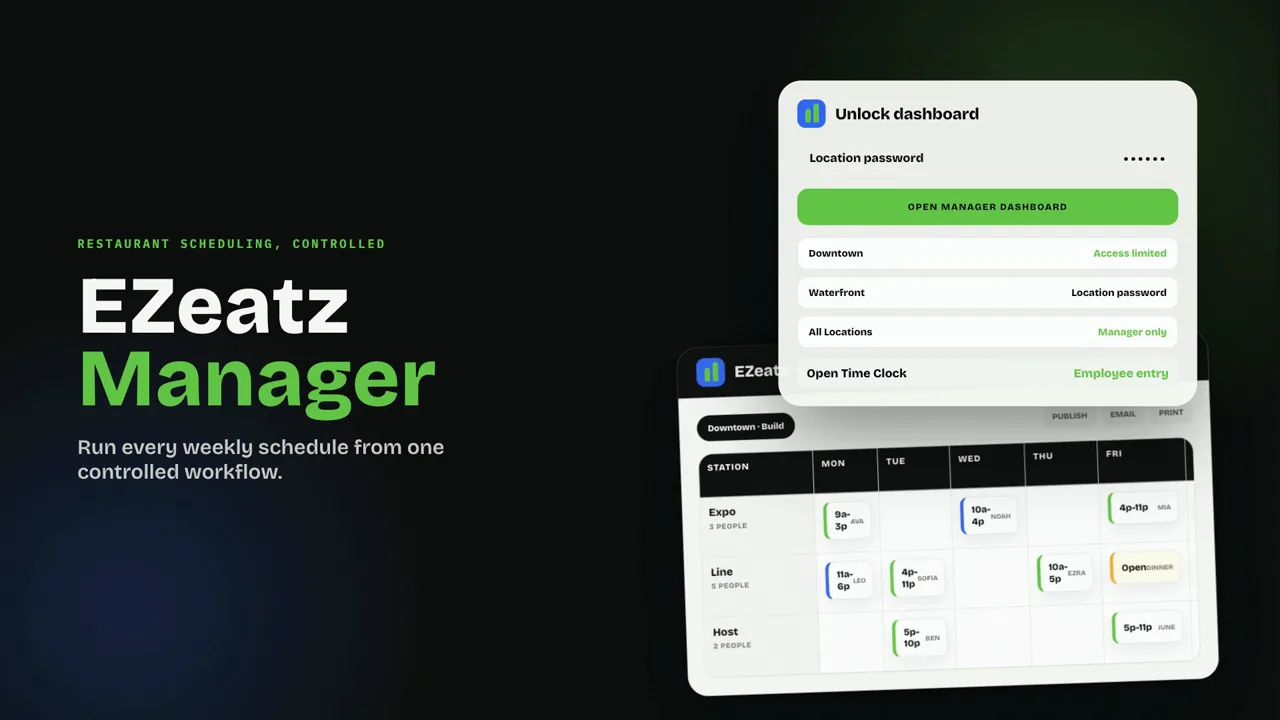
Week builder by station with shift chips, open shifts, draft schedules, published schedules, prior-week copy, and approved time-off visibility

SPLH and labor % control with projected sales, actual sales, pay rates, overtime rules, target status, and station include/exclude settings

Employee PIN clock-in and clock-out tied to scheduled shifts, with manager override for unscheduled work

Timecards and actual labor tracking with punch edits, audit reasons, open-punch cleanup, and scheduled-versus-actual deltas

Staff-facing My Week view for published schedules, future time-off requests, and clock-in access without manager controls

Schedule delivery through emailed schedules, selected recipients, print, and staff-friendly PDF layouts

Problem

The workflow problem behind the build.

The client was not just asking for names on a calendar. Their managers needed station coverage, open shifts, approved time off, other-store shifts, overtime risk, projected sales, SPLH, labor percent, day-of lineups, employee PIN clock-ins, editable timecards, emailed schedules, and actual labor movement in the same workflow. When those pieces live in separate tools, the schedule gets published without enough operating context and the real labor story only shows up after payroll.

What the system includes

Week builder by station with shift chips, open shifts, draft schedules, published schedules, prior-week copy, and approved time-off visibility

SPLH and labor % control with projected sales, actual sales, pay rates, overtime rules, target status, and station include/exclude settings

Employee PIN clock-in and clock-out tied to scheduled shifts, with manager override for unscheduled work

Timecards and actual labor tracking with punch edits, audit reasons, open-punch cleanup, and scheduled-versus-actual deltas

Staff-facing My Week view for published schedules, future time-off requests, and clock-in access without manager controls

Schedule delivery through emailed schedules, selected recipients, print, and staff-friendly PDF layouts

Feature Surface

What operators can actually do inside the system.

Build the week

  • Weekly grid by station such as FOH, BOH, Manager, Host, Line, Expo, or any custom role the store uses.
  • Color-coded shift chips for lunch and dinner service, with station filters when a manager only wants to work one role group.
  • Tap to add or edit shifts, drag shifts to another spot, and copy shifts across days or employees.
  • Open Shifts stays on the board for unassigned coverage, including when an employee quits or gets deleted.
  • Copy a prior week into a new week by all stations or selected stations, per location.
  • Draft and published schedule states so staff only see finalized weeks.
  • Approved time off appears directly on the build grid to prevent double-booking.
  • Multi-location staff show read-only shifts from other stores, with full-week hour totals for overtime awareness.

Labor and sales control

  • Projected daily sales drive live SPLH and labor percent by day and by week.
  • Actual sales can be logged after the week runs so planned labor can be compared against reality.
  • Stations can be included or excluded from SPLH, so manager hours do not distort the floor productivity number.
  • Per-station and per-employee hours and pay support different rates for roles like host, server, expo, cook, and manager.
  • Configurable overtime threshold and multiplier flag overtime on the schedule and payroll views.
  • Sticky KPI bar shows sales, hours, SPLH, and labor percent with green or red status against the store target.

Line-Up

  • Pick any day and see who is working by lunch and dinner service period.
  • Group the day by station with shift times, headcount, and quick coverage checks.
  • Live on-shift-now indicator helps managers see who should currently be active.
  • Double-shift callouts make long or split coverage visible before service gets messy.

Hours, timecards, and actuals

  • Scheduled hours and scheduled pay appear by employee and by day.
  • Actual hours entry works even for unscheduled work or days where someone was called in.
  • PIN clock-in and clock-out can be tied to the scheduled shift.
  • Manager override handles unscheduled clock-ins without breaking the audit trail.
  • Timecards can be viewed, edited, deleted, or closed when someone forgets to clock out.
  • Audit trail records manager name and reason for punch edits.
  • Clock punches sync into actual hours for labor math and schedule-versus-actual deltas.
  • Last-week comparison can use scheduled or actual labor by employee and station.

Stats and accountability

  • Plan-versus-actual reporting for sales, hours, pay, SPLH, and labor percent.
  • Daily breakdown charts and tables show where the week moved.
  • By-station labor breakdown separates FOH, BOH, management, and custom station groups.
  • Multi-location rollup shows totals plus per-store SPLH, labor percent, overtime, and headcount.
  • Target progress bars keep SPLH and labor percent visible instead of buried in a report.

Team and roster

  • Employee setup includes name, email, phone, auto PIN, primary station, extra stations, pay, and overtime eligibility.
  • Deactivate keeps employee history, while delete turns their future shifts into open shifts.
  • Station setup supports add, rename, color, sort order, and SPLH include-or-exclude behavior.

Multi-location

  • Multiple stores can each have their own SPLH and labor percent targets.
  • Staff can have a home location while still working shifts at other stores.
  • Owner password can access all locations, while location passwords restrict manager access by store.
  • Location switcher and all-locations rollup let ownership move from store detail to group performance.

Staff-facing schedule

  • My Week uses a PIN and only shows published schedules, not manager drafts.
  • Mobile-friendly staff view keeps schedule access simple without a manager login.
  • Time-off requests support full or partial days and future weeks only.
  • Manager approve-or-deny flow surfaces pending time-off counts on the schedule side.

Emailed schedules and settings

  • Email schedules to all staff or selected recipients.
  • Print or save PDF versions for manager review and staff-friendly posting.
  • Business branding controls name, tagline, email sender, and whether vendor branding is hidden.
  • Default daily sales templates speed up weekly planning.

Expected operating outcomes

  • Managers can build coverage while seeing time-off conflicts, open shifts, other-store commitments, and overtime risk before publishing
  • Owners can compare planned labor against sales targets, then review actual sales, punches, hours, pay, SPLH, and labor percent after the week runs
  • Staff get a simple published schedule, time-off request flow, and PIN clock-in without exposing manager controls
  • Multi-location operators can see per-store and rollup labor performance without losing each store's targets, stations, and staff rules

Questions this answers

What did we build for the client?

We built one system for schedule building, open shifts, time-off requests, projected sales, SPLH, labor %, employee PIN clock-ins, timecards, actual hours, payroll review, emailed schedules, and multi-location oversight.

Is this only a scheduling calendar?

No. Managers build and publish the week, employees clock in with a PIN, punches become actual hours, and the system reports scheduled versus actual labor, pay, overtime, SPLH, and labor percent.

What could employees do without manager access?

Employees could enter their PIN to see My Week, view only the published schedule, request future full-day or partial-day time off, and clock in or out against their shift.

Let's talk about
your operation.

Tell us about your restaurant or group and what you're trying to solve. We'll get back within 24 hours.

No pitch, no pressure

Response within 24 hours

30-minute discovery call